

Updated August 2025
I’m a Type A personality with an engineering degree and a project management certification. So, it shouldn’t be surprising that I’m a spreadsheets girl.
Canicross Tracking
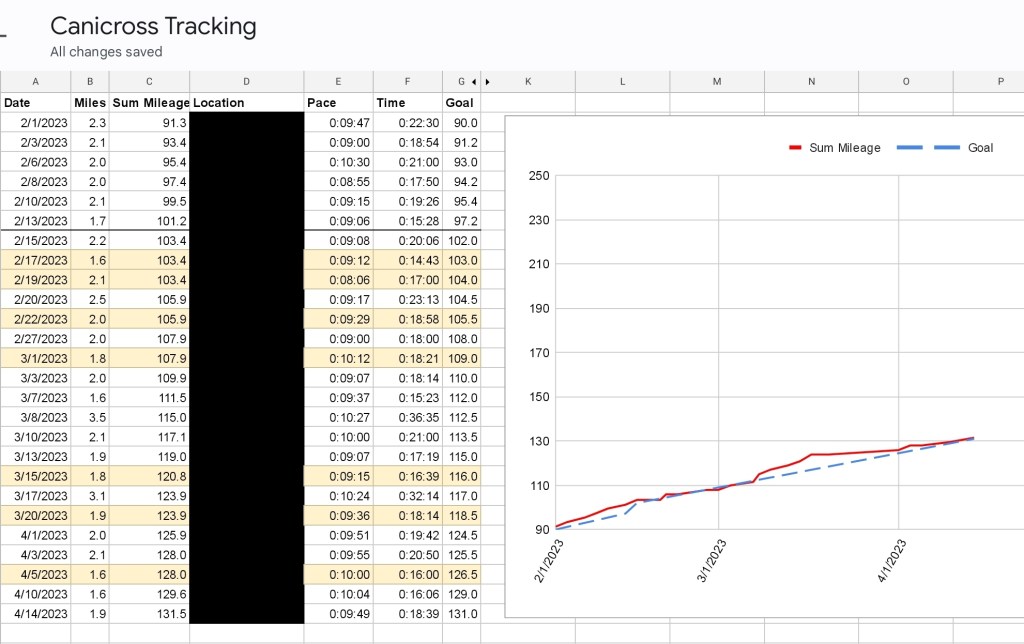
The first spreadsheet is relatively straightforward. Iris and I are members of North American Canicross. One of the three types of titles they offer in their titling program is “Lifetime Achieved Miles”. These are miles recording running (or walking, or hiking) canicross, which means it must be on a trail. When submitting miles logged, they ask for a few pieces of information: date, distance, pace, total time, and the trail name. Keeping tack of that information is the basis for this spreadsheet – I use a fitbit tracker, and manually pull the data on each run from there.
While NACC doesn’t recognize runs on pavement, sometimes I do have to run in my neighborhood, either because the trails are too wet or I’m short on time, so I record those too but don’t sum those miles into the “total mileage” (highlighted light yellow). I also include a “goal mileage” to keep us on track to the next LAM milestone (currently working on LAM250).
The result is my “Canicross Tracker” spreadsheet – I use google sheets since I can access it across all my devices (phone, tablet, work laptop, etc). The locations are blacked out for privacy – and yes, I know, I’m not a very fast (or far) runner, but with Iris at least I have fun!
Scentwork
As Iris hit the ground running in her scentwork career, it quickly became difficult for me to remember all of her results, the judges she showed under, her placements, etc. So the second spreadsheet contains all the information I can gather from her scentwork trials.
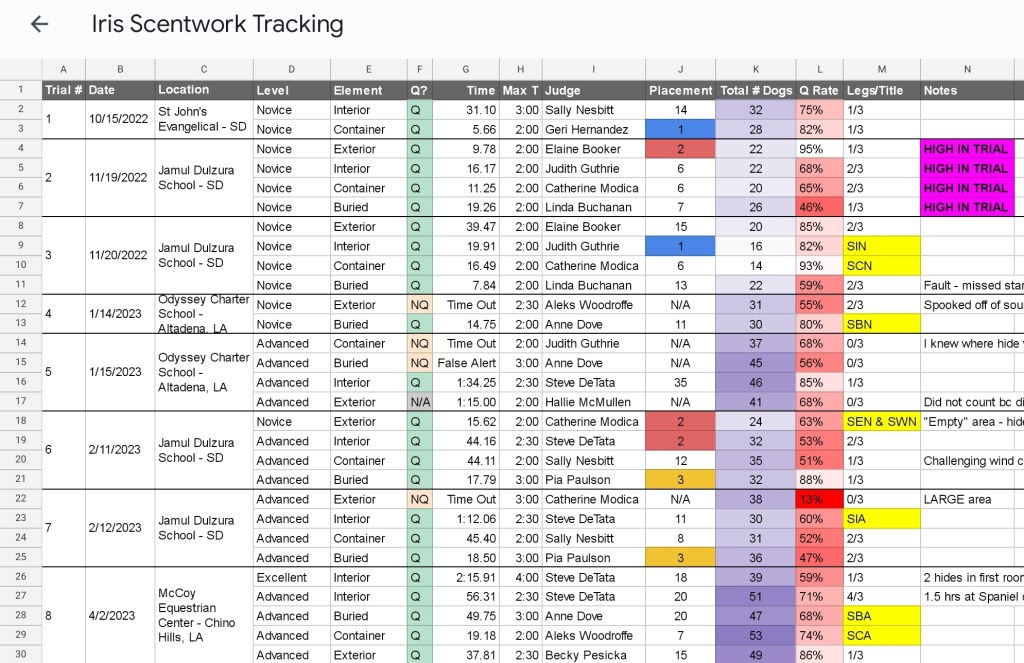
There’s the logisitical stuff – the trial number, where it was held, judge, level, element, and allowed time. Then Iris’s results, including a qualifying score or NQ, time (or reason for NQ), placement, and if an element title was completed or the number of legs completed toward it.
I also included information related to the difficulty of the search generally, like how many dogs total competed, as well as the rate of qualifying scores for that total number of dogs. Finally, there’s a column for notes – usually to highlight extra successes or mistakes.
Because I’m super visual, I also set up conditional formatting. So her placements are automatically highlighted with the ribbon color, Q’s are highlighted green, number of total dogs is on a gradient where more purple = more dogs, and Q-Rate is on a gradient where redder = harder. The result is our Scentwork tracker:
I have also have a separate “Analysis” tab to further compile and review data from our Scent Work journey. This sheet compiles total Qs and NQs and placements, as well as Q rates per level and comparison to the average Q rate of other entries:

I plan to do something similar if/when we compete in Rally/Obedience, but I think it’ll be especially useful for scentwork given how many runs can be done per day and how quickly they add up.
I’ve used spreadsheets for other dog-adjacent purposes as well, including tracking Iris’s heat cycles, data analysis on survey responses for an initiative I was running for my local obedience club, and an “impact/ability to execute” matrix for the Drent breed club to help determine which activities made the most sense for the club to pursue.
If it can be made into a spreadsheet, you better believe I can and will make it into a spreadsheet. 🙂


Leave a Reply